How it works
Where your session audio actually goes
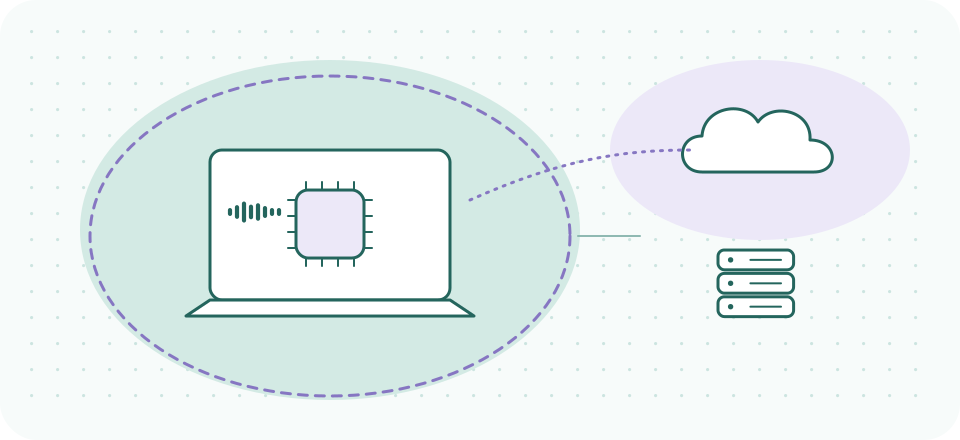
Every audio tool you add to a session is a decision about geography. Some tools do their work inside your computer and nothing about the conversation ever leaves the room it was spoken in. Others send audio — or text derived from audio — across a network to a machine you do not own, operated by a company you have a contract with, in a building you will never see. For most remote work that distinction is an engineering footnote. For a confidential session it is the first question, and almost nobody asks it out loud.
Standing note: this is technology guidance, not medical, legal, or compliance advice. Where we describe a vendor's architecture we are reporting what that vendor publishes, with the date we read it. Whether any given arrangement is appropriate for your practice is a determination for you and your compliance counsel — this page exists to make that conversation better informed, not to substitute for it.
The two architectures, in plain language
On-device processing means the software runs its model on your own processor. Your microphone signal goes into a piece of code sitting in your computer's memory, the cleaned-up signal comes out the other side, and the whole round trip happens in a few milliseconds without touching a network. The audio existed on your machine before the tool ran and it exists on your machine afterward. Nothing was copied anywhere.
Cloud processing means the audio — or a derivative of it — is transmitted to a remote server, processed there, and the result sent back. There are perfectly good engineering reasons to build this way: the biggest models are too large to run on a laptop, and a server farm can do things your machine cannot. But every cloud step introduces the same three questions, and they are questions rather than objections: what exactly was transmitted, how long is it kept, and who else has access to it while it is there?
A useful sharpening: "cloud" is not one thing. A tool might send raw audio, or send only a transcript, or send only an embedding, or store nothing while processing in memory, or keep a recording for ninety days. These are wildly different postures that all get marketed with the same word. When you evaluate a tool, the word "cloud" is where your reading should start, not stop.
- Send raw audio
- Send only a transcript
- Send only an embedding
- Store nothing while processing in memory
- Keep a recording for ninety days
Five postures the page lists — all of them marketed with the same word.
Why this lands differently in a session
The ordinary privacy argument — "I would rather my data stayed on my machine" — is a preference. In clinical and counseling work it becomes something with more weight behind it, for three reasons that have nothing to do with paranoia.
First, the content is unusually sensitive even by sensitive-data standards. A session is not a business call with some personal detail in it. It is fifty minutes of the things a person has decided to tell exactly one professional. The gap between that and a sales forecast is not a matter of degree.
Second, your obligations may not travel with your intentions. When you route a conversation through a third party's infrastructure, you have potentially brought a new party into a relationship that was built on there being only two. Whether that creates a formal obligation — a business associate relationship, a disclosure requirement, something else entirely — depends on jurisdiction, on your professional body, on the vendor's role, and on facts we cannot see from here. That is the compliance-counsel conversation, and it is much easier to have once you can say precisely what the tool does.
Third, clients did not choose your vendors. They consented to speak with you. The stack behind you is invisible to them, which is exactly why the responsibility for understanding it sits on your side of the screen rather than theirs.
The layers, sorted by where they run
On your device
- Your microphone's own processingOn the device, always
- Operating-system voice processingOn the device
- Browser WebRTC processingOn the device
- Dedicated suppression layer (e.g. Krisp)On the device, per vendor documentation
Straddling the line
- Transcription and AI notesMixed — read carefully
Across a network
- The telehealth platform itselfNecessarily networked
Built from the six rows of the table below — vendor architecture as published and read on 2026-09-20. Postures change; re-check before relying on any row.
| Layer | Where it runs | What that means for a session |
|---|---|---|
| Your microphone's own processing | On the device, always | No network involved. The least interesting layer from a privacy angle and often the most interesting from a quality one. |
| Operating-system voice processing | On the device | Echo cancellation and basic noise reduction built into macOS and Windows. Free, local, already running. |
| Browser WebRTC processing | On the device | What a browser-based platform like Doxy.me inherits. Local processing, applied before the platform receives the stream. |
| Dedicated suppression layer (e.g. Krisp) | On the device, per vendor documentation | Krisp's security documentation describes the app as operating locally on the user's machine; the noise cancellation is marketed as on-device. |
| The telehealth platform itself | Necessarily networked | The call has to traverse someone's infrastructure to reach your client. This is the layer a BAA is usually about. |
| Transcription and AI notes | Mixed — read carefully | The layer with the most variation and the least careful marketing. See below. |
The transcription layer deserves its own reading
AI note-takers are the fastest-moving category touching this audience, and they are where the on-device/cloud question gets genuinely subtle rather than binary. Krisp is a useful worked example precisely because its documentation is more specific than most.
Read on 2026-09-20, Krisp's security page for its AI Meeting Assistant states that "Meeting transcripts are generated on the user's machine" using in-house speech-to-text — so the audio itself is not necessarily streaming out for transcription. In the same documentation, though, the assistant "stores more data in Krisp Cloud (e.g. meeting transcripts, recordings, etc)", and summaries are generated from those transcripts using Microsoft Azure services. Unpack that and you get a posture no single word describes: local transcription, cloud storage of the resulting text and recordings, and a third-party cloud service involved in summarization.
- On the user’s machinemeeting transcripts are generated
- Krisp Cloudtranscripts, recordings stored
- Microsoft Azure servicessummaries generated from those transcripts
Krisp’s AI Meeting Assistant, as its own security page described it on 2026-09-20. “The transcription happens on your device” and “nothing about this conversation leaves your device” are different sentences.
Whether that matters to you is not ours to say, and the underlying question — whether to record or transcribe sessions at all — is clinical and legal territory we deliberately stay out of. What we will say is that "the transcription happens on your device" and "nothing about this conversation leaves your device" are different sentences, and a vendor can honestly say the first while the second is false. Reading for that gap is the skill this page is trying to transfer.
The practical upshot for a provider who wants the audio benefit without the data question: most tools of this shape let you run suppression with the assistant features switched off. That configuration is the one we describe in our full Krisp assessment, and it is what we would default to for session work.
Questions worth sending a vendor
These are deliberately phrased to be answerable in writing, because an answer in writing is the thing your counsel can actually use. Vague reassurance from a chat widget is not evidence of anything.
- Does audio leave the device during noise processing? A direct yes or no, not "we take privacy seriously."
- If any audio or transcript is transmitted, where is it stored, for how long, and can I turn storage off? Retention is the question most often skipped and most often decisive.
- Which subprocessors touch the content? The Azure detail above is exactly the kind of thing that only surfaces when you ask this one.
- Is a BAA available on my plan, and will you name the plan? Covered at length in audio tools and BAAs, including a live example of a vendor whose documentation names a plan tier that its pricing page does not sell.
- What happens to my content if I close the account? Deletion policy is where a privacy posture is either real or decorative.
The honest summary
On-device processing is the architecture we prefer for session work, and we want to be clear about why, because the reason is narrower than "cloud bad." A local suppression layer does not add a party to the conversation. That is it. That is the whole advantage, and it is a real one: it means the decision about whether a third party should be involved in a confidential hour stays a decision you make deliberately, about your platform and your notes, rather than one you make accidentally by installing a microphone utility.
Meanwhile the layer most likely to be doing something you have not thought about is not your noise suppression at all. It is whatever is transcribing, summarizing, or "assisting" — a category that barely existed when most practices last reviewed their technology. If you audit one thing this quarter, audit that.
The local layer, if you want one
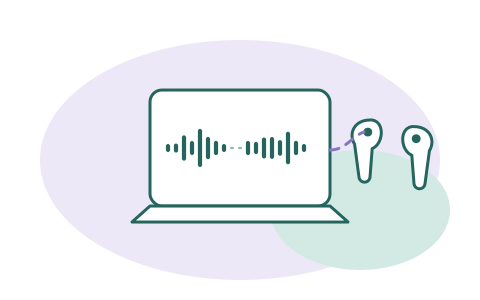
Krisp is our default recommendation for a suppression layer precisely because of the architecture described above: per its own security documentation, the app operates locally and the noise cancellation runs on your device. Checked 2026-09-20: 7-day free trial, then Core at $8/month billed annually or $16 monthly.
A referral link, said plainly: if a Krisp subscription starts from this button, Krisp may pay SessionSound, and what you pay stays the same. None of that changes what we report — the Azure detail above included. The zero-cost local options on this page, which pay us nothing: your operating system's built-in voice processing, and your browser's WebRTC stack.