The core guide
Telehealth audio quality: a clinician's guide
Fifty minutes of conversation is the product. Not the video, not the platform, not the scheduling reminder — the conversation. Which makes telehealth unusual among remote-work settings: audio isn't one channel among several, it is very nearly the whole clinical encounter. This guide covers what actually determines how a session sounds, in the order that repays attention, and it stays inside our lane the entire way: technology, not treatment.
Standing note: nothing here is medical, clinical, legal, or compliance advice. Where vendors make compliance claims, we report them as published, with dates, for you to take to your own counsel.
Why session audio fails differently
Meeting audio and session audio break in different places, because the two kinds of conversation are shaped differently.
First, sessions are full of silence, and silence is where audio software misbehaves. Noise gates and aggressive suppression models decide during a pause that nobody is talking, spin down, and then clip the first syllable when someone finally speaks. In a stand-up meeting that's a cosmetic glitch. In a session, the sentence that follows a forty-second pause is frequently the one that matters, and losing its first word is not cosmetic.
Second, the signal you care about is wider than intelligibility. Compression that would be perfectly acceptable on a sales call flattens exactly the things a clinician listens for — breath, hesitation, the drop in energy at the end of a sentence. You can transcribe a heavily processed voice perfectly and still have lost information. That is why our advice throughout this site leans toward moderate processing on the incoming side: clean up your own microphone as aggressively as you like, but think twice before stacking heavy processing on top of what your client sends you.
Third, the stakes of a dropout are asymmetric. A client mid-disclosure who hears "you're breaking up" experiences something worse than inconvenience. The engineering goal for session audio is therefore not maximum quality on the best days — it's the smallest possible number of terrible moments on the worst ones. Stability beats fidelity.
- FirstSilence is where audio software misbehaves.
- SecondThe signal you care about is wider than intelligibility.
- ThirdStability beats fidelity.
The path your voice actually takes
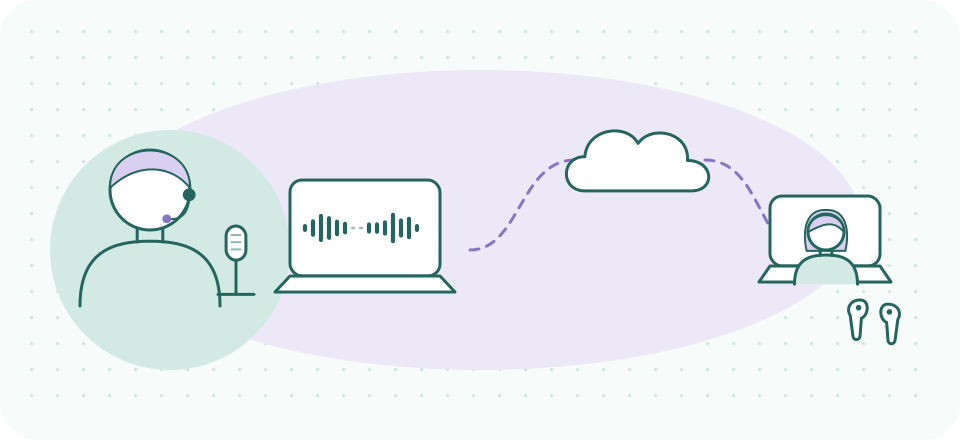
Every fix on this page targets one link in a chain that runs: your voice → your microphone → your device's processing → your network → the platform's servers (or a direct peer connection) → the client's network → their device → their speaker or earbuds. And the same chain in reverse, simultaneously, for their voice. Two facts about this chain do most of the explanatory work:
- The weakest link sets the ceiling. A studio-grade setup on your end cannot rescue a client on hotel Wi-Fi with the phone on a pillow. Much of telehealth audio quality lives on the client's side, which is why the last section of this guide is about coaching that side gracefully.
- Damage is cumulative and mostly irreversible. Each stage can only work with what the previous stage handed it. Once a bad microphone position has buried your voice in room reverb, no downstream software fully restores it. This is why fixes have an order.
Your end
- Your voice
- Your microphone
- Your device's processing
- Your network
In between
- The platform's servers (or a direct peer connection)
Their end
- The client's network
- Their device
- Their speaker or earbuds
Eight links, in the order this guide lists them. The same chain runs in reverse, at the same time, for their voice — and the weakest link sets the ceiling.
The order of operations
- Stabilize the connection. Wired beats wireless where possible; if you're on Wi-Fi, closer to the router beats farther. Close the backup app, the sync client, the streaming tab. Connection instability produces the dropouts and time-stretch artifacts that no audio setting can compensate for, so it comes first — everything else is decoration until the transport is steady.
- the highest-yield changeFix microphone distance. The single highest-yield change in this guide. A microphone within roughly 30 cm of your mouth captures your voice well above the room's noise and reverb; a laptop mic at arm's length captures the room with your voice somewhere inside it. Any reasonable microphone close up beats an expensive one far away. (What to buy is out of our lane — placement is the point.)
- Quiet the machine itself. Notifications are the classic session-breaker: the chime lands on your microphone and in your client's ear. Enable your operating system's focus/do-not-disturb mode for session hours. While you're there, check that the platform is using the microphone you think it is — after OS updates, the selected input has a way of silently reverting to the built-in mic.
- Let the platform's own processing work. Every serious telehealth platform applies echo cancellation and some noise reduction on its own; our platform audio landscape covers what each one publishes. Built-in processing is free, already integrated, and for a quiet room it is often genuinely enough. Try it honestly before adding anything.
- Add a dedicated suppression layer only if the room demands it. A shared apartment, a thin-walled office suite, construction season, a client base that calls from cars: this is where an add-on layer earns its place. Our default recommendation is Krisp, covered in depth — including its limits and its privacy posture — in Krisp for telehealth providers.
- Only then think about the room. Soft surfaces beat hard ones and closed doors beat open ones, but room acoustics is a shallow lever compared to the five above, and physical treatments are outside what we cover. If the first five steps are done, the room is rarely your problem.
Close: any reasonable microphone
Far: a laptop mic at arm's length
The single highest-yield change in this guide. Placement, not purchase — what to buy is out of this site’s lane.
The suppression question, taken seriously
Noise suppression models are trained to answer one question: which parts of this signal are speech? Speech stays; everything else is attenuated. Applied to your own microphone, that trade is almost pure upside — your client is spared the corridor, the keyboard, the household. Two caveats deserve honest treatment, though.
Caveat one: suppression can eat quiet speech. The failure mode that matters for sessions is a soft-spoken client, a long pause, and a model that has decided the channel is silent. If a client's first words after a pause sound clipped, heavy processing somewhere on the path is a prime suspect — theirs, the platform's, or yours. The fix is to reduce layers, not add them: one good suppression stage beats three stacked ones every time.
Caveat two: what gets removed is information. On the incoming side, the noise around your client is sometimes signal — the environment they're calling from, whether they're alone, the interruption that just happened. Suppressing your own mic is uncontroversial; how much processing to apply to their audio is a judgment call that belongs to you, not to a default setting. We lay out where each tool does its processing in where your session audio goes, because for confidential work the location of that processing matters as much as its quality.
What the platforms bring
The telehealth platform market has consolidated around a few names, and their audio postures differ more than their marketing suggests. As of 2026-09-20: Doxy.me runs in the browser with no downloads, offers a free tier, and carries "HIPAA-compliant" and "Free BAA" badges on its homepage — its claims, reported here as published. SimplePractice includes telehealth inside its practice-management suite, presenting it as HIPAA-compliant with HITRUST badging and a BAA page. Zoom's healthcare offering — currently sold as Zoom Workplace for Healthcare — publishes that it executes BAAs and aligns its controls to the HITRUST CSF, though its compliance page stops short of naming which subscription tiers qualify; a BAA is a separate execution step either way. The full comparison, including what each publishes about audio processing specifically, lives in the platform audio landscape; the BAA thread gets its own treatment in audio tools and BAAs.
What we deliberately don't do is publish settings walkthroughs for general-purpose meeting apps — that's a different job done well elsewhere. Our interest is narrower: what the platform does to session audio, and what it publishes about where that audio goes.
When the connection is the problem
Rural clients, hotel Wi-Fi, phones on cellular: some fraction of your caseload will always arrive on a bad pipe, and the highest-leverage response is a pre-agreed fallback rather than mid-session improvisation. The pattern that works: audio first, video optional. Video is the bandwidth hog; when a connection degrades, turning cameras off returns headroom to the audio stream, and most platforms recover voice quality within seconds. It is worth establishing in the first session — "if the connection struggles, we'll drop video and keep talking, and if the call drops entirely, I'll call you back at this number." Thirty seconds of expectation-setting converts a technical failure into a routine both sides know.
- If the connection struggleswe’ll drop video and keep talking
- Cameras offheadroom goes back to the audio stream
- If the call drops entirelyI’ll call you back at this number
Agreed in the first session, so the failure becomes a routine both sides know.
Two quieter tactics help at the margin. Joining a few minutes early lets the platform's adaptive algorithms settle before the session starts rather than during its first exchange. And on your own side, anything saturating the connection — cloud backups, large downloads, someone else's video stream on the same network — is cheaper to pause than to compete with.
Coaching the client's side without becoming tech support
You cannot audit your client's setup, and trying would cost rapport you need for other things. What works is folding one or two audio expectations into the intake and onboarding material you already send: a phone propped up rather than held, earbuds if they have them (their mic sits closer to the mouth than the phone's does, and echo drops away), a private room if one exists — which is their sound privacy as much as yours. Framed as "so that I can hear you properly," it lands as care rather than as an IT requirement.
The one thing not worth doing is troubleshooting live at the top of a session. The two-minute version of triage — can they switch to earbuds, can they move closer to the router, should you both drop video — resolves most situations; anything deeper belongs between sessions, not inside one. Our session audio problems page is written to be triaged from in exactly that spirit, and the pre-session checklist exists so that your own side never becomes the variable.
Questions clinicians actually ask
- Should I turn off video to save the audio?
- On a weak connection, yes. Audio degrades before video becomes useless, and platforms reallocate bandwidth to voice quickly once cameras stop. Agree on the fallback in advance so it feels like procedure, not failure.
- Does noise suppression remove things I need to hear?
- It can — that's its job. Non-speech sound on the client's side (a door, a raised voice in another room, crying) may be attenuated by processing anywhere on the path. Suppress your own mic freely; treat processing on the incoming side as a considered choice.
- Is built-in platform suppression enough?
- In a quiet room, frequently yes — and it costs nothing, which is why it's step four rather than step five. Dedicated tools earn their subscription in environments the built-ins can't handle.
- Do audio tools need a BAA?
- That's a determination for your compliance counsel, not for us. Our contribution is a dated record of what each vendor publishes so the conversation starts from facts.
- One fix, today, no spending?
- Halve the distance between your mouth and whatever microphone you already have. Nothing else on this page has that ratio of effort to result.
If the room is the problem, this is the tool
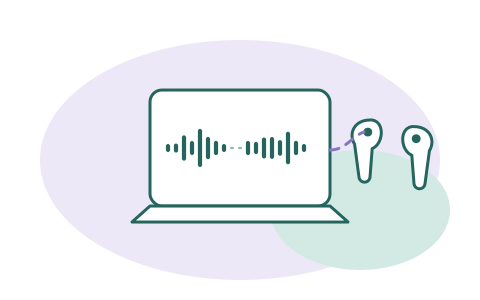
Krisp adds an on-device noise-suppression layer between your microphone and any telehealth platform — the audio cleanup happens on your machine, not in the cloud. Checked 2026-09-20: 7-day free trial, no card required; Core plan $8/month billed annually or $16 month-to-month. Krisp's help center still documents a legacy free plan (60 minutes/day) that no longer appears on its pricing page — details in our dated note.
A referral link, said plainly: if a Krisp subscription starts from this button, Krisp may pay SessionSound, and what you pay stays the same. Read the full assessment — limits included — first. The zero-cost path: your platform's built-in suppression, which pays us nothing and is where we'd start.