Triage · One platform
Doxy.me audio not working? A clinician's fix order for both sides of the call
When Doxy.me audio fails, first decide whose side is failing, because that tells you what to ask the client to do. If you hear your own voice echoing back, the problem is on the client's end. If the client's level meter moves but you hear nothing, it is on yours. If neither of you hears the other, ask the client to run Doxy.me's pre-call test while you check your own microphone permission. Doxy.me's help articles say a full restart of both computers solves most stubborn cases; save that for when the quick checks fail, and agree on a phone fallback before it gets that far.
Scope. Technology guidance for one platform, drawn from Doxy.me's own help articles. Not medical or legal advice. The articles we cite sit on help.doxy.me, which Doxy.me now labels as its help center for legacy clinic plans; if you are on a current plan, check helpcenter.doxy.me for any newer version. For symptoms on any platform, see our general triage page.
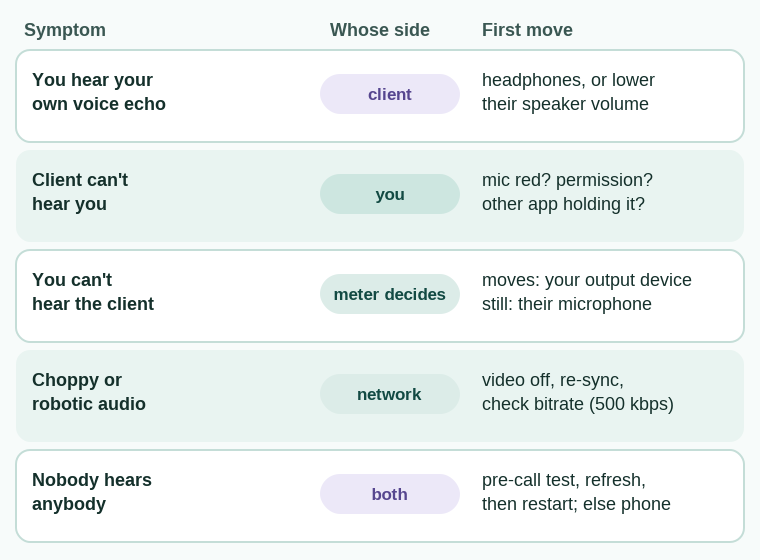
Built from Doxy.me's help articles on hearing problems, poor audio and echo, read 2026-10-18.
Whose side is it? The 30-second rule
Three observations, in this order, answer the question before you touch a setting:
- Do you hear yourself? An echo of your own voice comes from the client's speakers feeding back into the client's microphone. Doxy.me's echo article puts it from the listener's view: if you hear the echo, ask your participant to act.
- Does their level move? If the client's audio indicator moves while they speak and you hear nothing, their sound is reaching your computer and stopping there, usually at your output device.
- Does your mic show as muted? Doxy.me says a muted microphone shows red. It is the most embarrassing fix and the fastest one.
Only when all three are clean do you need the longer lists below.
Client side: the pre-call test and speaker checks
Doxy.me's article on hearing problems starts with its own tool: the doxybot pre-call test at doxy.me/precall-test, which the provider and the patient can each run on their own device. Send the link in your appointment reminder so the client runs it before the session, not during it.
- Are their speakers actually playing? Doxy.me suggests checking that sound is not going to headphones or another output the client isn't wearing.
- Is the right device selected? Both of you can open Doxy.me's device settings before or during the call to see which microphone and speakers are in use.
- Did the browser get permission? The first visit asks for microphone access; if the client clicked deny, you will not hear them.
- Is the device supported? Doxy.me's patient guide (dated 7 May 2026) lists e-readers such as Kindle and voice-controlled smart speakers as incompatible, and recommends an up-to-date browser.
Your side: permission, device picker, competing apps
Most provider-side faults are a device or permission that changed since last week: an OS update, a new dock, a browser update that reset site permissions.
- Check the browser. Doxy.me lists Chrome, Firefox, Edge and Safari as compatible, and suggests switching browsers if one misbehaves.
- Close other call software. Doxy.me notes that apps like Skype or FaceTime can hold the microphone; its poor-audio article adds that several apps reaching for one mic cause interference.
- Check the audio type. Doxy.me's medical-grade audio mode, meant for devices like digital stethoscopes, "disables noise suppression and increases the audio bitrate", and changing it affects both sides. If a previous session left it on, everyday room noise comes through unfiltered. Set it back to Standard.
- If you run a suppression layer, select its virtual microphone in Doxy.me's device settings, and check after updates that it still points at your real microphone. See Krisp for telehealth for the fit question.
Echo and choppy audio
For echo, Doxy.me's advice to the participant who is causing it is to use headphones, lower the speaker volume and move the microphone away from the speakers. It also warns that unstable connections can push the two audio feeds out of sync, which produces echo even with good habits. For choppy, robotic or out-of-sync audio, its poor-audio article (dated 5 March 2024) suggests moving closer to the router, avoiding Bluetooth headsets in favor of a USB or inline microphone, and using the provider's re-sync option in call settings, which restarts the call quickly.
Doxy.me's patient guide recommends at least 500 kbps for both sides of a video call and points to its own network test at networktest.doxy.me. If the client's number falls short, turning off video is the practical move; audio needs far less.
A script to read to your client
Read it calmly, and type it in the chat as well if they cannot hear you.
"I'm having trouble hearing you, and it's a technical thing, nothing you did. Could you look at the bottom of your screen and check the microphone isn't red? If that's fine, please refresh this page, and when it asks for the microphone, click Allow. If we still can't hear each other in two minutes, I'll call you on the number we agreed."
Keep the instruction to one step at a time. A client who is anxious about the session and the technology at once does better with "check the red microphone" than with a list of five things.
When to switch to phone
Set the rule before the session, not during it: if audio is not working within a few minutes, you phone the client. Every minute spent troubleshooting comes out of the hour. Our core guide covers agreeing that fallback at intake, and HHS has published guidance on audio-only telehealth under the HIPAA rules; how it applies to your practice is a question for your compliance adviser, not for us. Afterwards, the between-sessions fix belongs in your pre-session checklist.
Doxy.me audio questions
- Why can't my patient hear me on Doxy.me?
- Usually microphone permission, the wrong microphone selected, or another app holding it. Check that your mic isn't shown red, check device settings, then refresh.
- Why do I hear an echo on Doxy.me?
- If you hear your own voice, the client's speakers are feeding their microphone. Ask them to use headphones or lower their volume.
- What is the Doxy.me pre-call test?
- Doxy.me's doxybot test at doxy.me/precall-test, which checks the microphone and speakers on the device it runs on. Both you and the client can run it.
- Why did background noise suddenly get worse on Doxy.me?
- Check the audio type. Doxy.me's medical device mode switches off noise suppression for both sides; set it back to Standard if it was left on.
- Which browsers work with Doxy.me?
- Doxy.me's troubleshooting article lists Chrome, Firefox, Edge and Safari as compatible. Keep whichever you use up to date.
A steadier microphone on your side
When the fault is your room rather than the connection, an on-device layer that installs as a virtual microphone should show up in Doxy.me's device settings like any other mic. We have not tested it on Doxy.me, so confirm on a test call first. Krisp's terms on 2026-10-18: a free trial of 7 days, no card taken, then Core for $8 each month per seat when you prepay a year, or $16 month by month. It has no free plan, and its live noise cancellation works in the desktop app only.