Tool assessment
Krisp for telehealth providers
Krisp is the tool we name most often on this site, so it earns the site's most careful scrutiny. This page is the assessment we would want as a clinician: what it does, where it runs, what its own compliance pages do and do not say, what it costs today, and where it is the wrong answer. If you only read one section, read the one about the two pipelines — it is the part telehealth providers most often miss.
Standing note: technology guidance only — not medical, legal, or compliance advice. Krisp's compliance claims below are reported from Krisp's own published pages, dated; whether any of it satisfies your obligations is a question for your compliance counsel.
What it is, in one paragraph
Krisp is a desktop application (macOS and Windows) that installs itself as a virtual microphone and speaker. Your telehealth platform — Doxy.me in a browser tab, SimplePractice's suite, a healthcare Zoom account — sees "Krisp Microphone" as an input, and Krisp strips background noise from your voice before the platform ever receives it. It can filter the incoming direction too, quieting the noise around your client. Because it operates at the system level, it follows you across platforms: switch your practice from one telehealth vendor to another and your audio layer stays put.
The two pipelines — read this part
Krisp today is two products in one app, and for confidential work the distinction is everything.
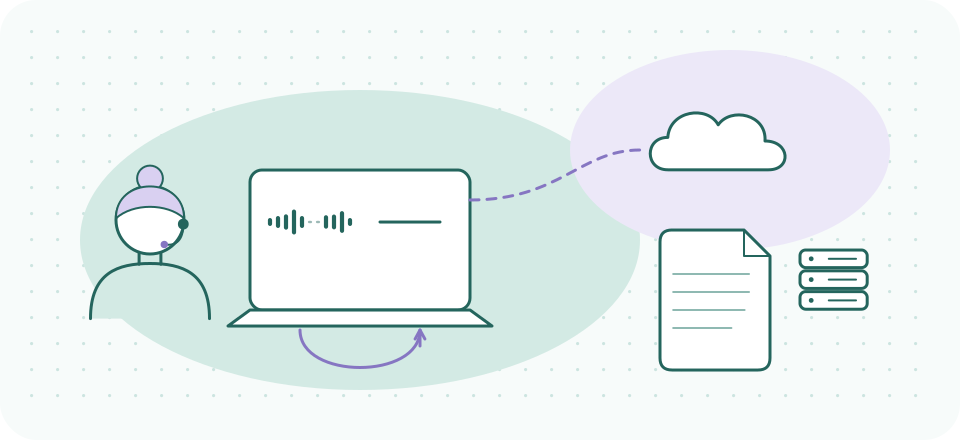
Pipeline one: noise suppression. This is the part that runs on your machine. Krisp's security documentation for the AI Meeting Assistant states that the "Krisp app operates locally on the users' machines and most of the time doesn't need to connect to its backend" (read 2026-09-20), and Krisp markets the noise cancellation itself as on-device processing. For session confidentiality that is the architecture you want: the suppression layer adds no new third party to the conversation itself.
Pipeline two: the AI Meeting Assistant. Krisp also sells transcription, meeting notes, and summaries, and the data path there is genuinely different — in a way that is more interesting than "it all goes to the cloud." Per Krisp's own security page for the assistant, read 2026-09-20: "Meeting transcripts are generated on the user's machine" using in-house speech-to-text, but the assistant "stores more data in Krisp Cloud (e.g. meeting transcripts, recordings, etc)", and summaries are produced using Microsoft Azure services from those transcripts. So the audio may not stream out for transcription, while the transcript — the words of the session — can be stored by Krisp and passed to a third-party cloud service for summarization. Whatever you decide about recording or transcribing sessions (a clinical and legal question we do not touch), that is the distinction to take to your counsel. Our plain reading for this audience: you can run Krisp as a suppression-only layer with the assistant features left off, and many providers will want exactly that configuration. The general question of processing location has its own guide.
1Noise suppression
- Your microphone
- Suppression on your machineoperates locally, per Krisp
- Your telehealth platform
2AI Meeting Assistant
- Transcripts generated on your machine
- Stored in Krisp Cloudtranscripts, recordings
- Summaries via Microsoft Azure
As Krisp’s own security documentation described them on 2026-09-20. Suppression-only — assistant features off — is the configuration this site describes.
What Krisp publishes on HIPAA
We do not call any tool "HIPAA-compliant" on our own authority. Here is what Krisp itself publishes, as read on 2026-09-20, and nothing more.
- On BAAs, Krisp is specific: its AI Meeting Assistant security page states that "Signing a Business Associate Agreement (BAA) is available to subscribers of the Business tier of Krisp AI Meeting Assistant only," directing interested customers to contact Krisp to request a copy. Note the friction in that sentence: on the same date, krisp.ai/pricing listed its tiers as Core, Advanced, and Enterprise, with no tier named "Business" — so the plan name in the security documentation does not map cleanly onto the plan names being sold. If a BAA matters to you, get the mapping in writing from Krisp rather than inferring it from either page, ours included.
- On ePHI, Krisp disclaims handling it. Its HIPAA Notice states: "Krisp does not knowingly collect, access, retain, process, or disclose any ePHI," adding that it does not inspect content for ePHI and applies the same security standards to all user content. That is a meaningful posture to read closely — it is a vendor saying it is not looking, not a vendor certifying your use case.
- On assurance: Krisp publishes a SOC 2 Type II report, available through its Trust Center, and names a Privacy Officer contact. A SOC 2 Type II report is an auditor's attestation about controls, not a HIPAA certification — no such certification exists to hold.
Put plainly: do not assume the $8 individual plan includes a BAA. If your compliance posture requires one for an audio layer, that is a direct conversation with Krisp and with your counsel, held before you rely on the tool — not a conclusion to draw from this page.
What it costs today
Checked 2026-10-08 at krisp.ai/pricing: 7-day free trial, no credit card. Core runs $8/month on the annual plan, $16 month-to-month. Advanced: $30 monthly or $15/month annually. Enterprise: custom. There is no free plan: Krisp has retired it, help-centre page and all, and its terms end access when the trial does unless you subscribe. How that played out is recorded in our dated note.
Drawn from the dated box above. Annual billing is half the month-to-month rate on both paid tiers; $96 a year is twelve Core months at $8.
For a practice, the honest framing of $96/year: whether it is worth it depends entirely on your rooms — yours and your clients' — which is what the next two sections are for.
Where it earns its subscription in a practice
- Home-based practice with a household. The core case. Family sounds, deliveries, the dog — suppressed before they reach the session. Pairs with the customs in our home sound-privacy guide, which handles the direction software cannot.
- Thin-walled office suites. The corridor conversation and the neighboring suite's phone calls stay out of your outgoing audio. (What clients in your waiting room can hear of you is the masking question — covered separately.)
- Clients in hard environments. Incoming-direction filtering quiets the laundromat, the car, the break room your client calls from. Apply it thoughtfully — the caveats about processing a client's audio in the core guide apply doubly here.
- Platform switchers. If your practice may change telehealth vendors, a system-level layer means your audio setup survives the migration untouched.
Where it is the wrong answer
- A quiet room on a good platform. Built-in processing is free and sufficient more often than the category's marketing suggests. Run the checklist for a week before paying for anything.
- Sessions from a phone or tablet. Krisp's noise suppression is a desktop product; its mobile presence centers on other features. If your telehealth day happens on an iPad, this is not your tool (checked 2026-09-20).
- Fixing a bad connection. Suppression cleans noise; it cannot reassemble packets that never arrived. Dropouts and robot-voice are connection problems — see session audio problems.
- A BAA-required posture on an individual plan. Per the section above, Krisp's published position ties BAA signing to one tier of the AI Meeting Assistant — and that tier's name does not match its current pricing page. Resolve the agreement question in writing first if your counsel says you need one for an audio layer.
Our bottom line
As a suppression-only layer — assistant features off, on-device pipeline doing the work — Krisp is the strongest fit we know for telehealth providers whose rooms are the problem. It is genuinely optional for providers whose rooms are already quiet, and we would rather you discover that during the free trial than after a year of subscription. That sentence is the whole reason this page lists the "wrong answer" section before the button.
Try it against your actual room
Seven days is enough to run it through a full client week — shared-wall day, household-chaos day, the client who always calls from the car. If the built-ins were already enough, cancel and keep the knowledge.
A referral link, said plainly: if a Krisp subscription starts from this button, Krisp may pay SessionSound, and what you pay stays the same. It does not change what we report — this page's "wrong answer" list included. Zero-cost alternatives we recommend first: your platform's built-in suppression, and Doxy.me's free tier (no affiliate relationship).