Platforms · Side by side
Doxy.me vs Zoom for telehealth: the audio side compared
For session audio, the difference between Doxy.me and Zoom is a trade between simplicity for the client and control for you. Doxy.me runs in the browser with nothing to install, which removes a whole class of client-side failures, and gives the clinician one main audio choice: Standard, or a medical-device mode that switches noise suppression off. Zoom asks most clients to use its app, and in return documents several levels of background noise suppression, a voice-profile isolation feature and a mode that turns processing off. Both publish a route to a BAA, on different terms. Neither choice settles whether your arrangement meets your obligations; that is a question for your compliance counsel.
How to read this page. A comparison of what each vendor publishes about audio and agreements, quoted and dated. It is not a review or a rating, and we do not offer legal or compliance advice. We do not certify either platform, and there is no HIPAA certification for anyone to hold.
How clients join, and why it matters for audio
Doxy.me's homepage promises "No downloads", and its patient guide tells clients they "don't need a doxy.me account" to join; they click the provider's link. Doxy.me's help center describes the call itself as a peer-to-peer WebRTC connection. In audio terms, the browser does the capture, so the browser's microphone permission and device choice are the points of failure. Our triage page covers what to check when either one fails mid-session.
Zoom documents its noise controls for its desktop apps on Windows, macOS and Linux, and its mobile apps. The article documents those controls for the apps; we did not check what a client joining another way gets. Installation is one more step for a nervous first-time client, but it also means a client who uses Zoom elsewhere arrives with audio that already works.
The audio controls each one documents
This is where the two diverge most. Doxy.me's help article on medical-grade audio says that moving the audio type from Standard to Medical device turns noise suppression off and raises the bitrate, for you and the patient alike. That implies Standard keeps suppression on. Beyond that switch, Doxy.me's audio articles focus on habits (headphones, distance, closing other apps) rather than adjustable levels.
Zoom's support article on noise suppression, read the same day, describes four background-suppression levels in its desktop app, Auto, Low, Medium and High, with High described as the level that removes even "background speech from others". It also documents personalized audio isolation, which "uses your voiceprint" to suppress background noise, and an "Original sound for musicians" mode that removes the filters. We describe what exists, not how to set it; walking through Zoom menus is a different kind of guide.
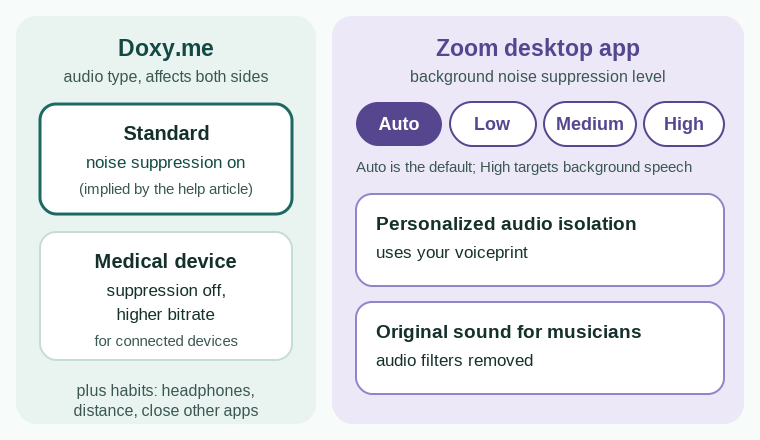
From Doxy.me's "Use medical grade audio" help article and Zoom's noise-suppression support article, both read 2026-10-18.
For a quiet office, the difference rarely matters. For a clinician in a shared home with voices nearby, a documented setting that targets background speech is a real advantage, and on Doxy.me the equivalent job falls to an on-device layer on your own computer.
Side by side, as published
| Question | Doxy.me | Zoom |
|---|---|---|
| Client joins by | A link in the browser, "No downloads", no account | Its apps for full audio controls |
| Noise suppression | On in Standard audio; off in Medical device mode | Auto by default; Low, Medium, High available |
| Removing other voices | No setting found in the articles we read | High level; personalized audio isolation |
| Special audio mode | Medical device audio for connected devices such as digital stethoscopes | Original sound for musicians; high-fidelity music mode |
| BAA, as published | "Free BAA" on the homepage; "BAA included" on Premium | On Pro at checkout; Business and up via sales; also other paid plans |
| Published price | Free version; Premium $29 per user per month, billed annually | Not checked for this page; see Zoom's healthcare pricing |
| AI features | Premium lists automated notetaking and session summaries | Available with a BAA, though "Certain AI features may not be available" |
What each publishes about BAAs
Doxy.me's homepage lists "Free BAA" among its badges, beside "HIPAA-compliant", "SOC 2-certified" and "End-to-end encrypted". Its pricing page states "BAA included" under the Premium plan's security features. We report those as Doxy.me's own claims, as read on 2026-10-18.
Zoom's support article on its HIPAA BAA states that Zoom "offers Pro, Business, Business Plus, and Enterprise plans to customers in the healthcare space" and "also enters into BAAs with customers who are subscribed to other paid plans". For Pro, it describes choosing a United States BAA during checkout; for Business and above, contacting sales; for an existing healthcare plan, enabling the agreement from plan management. On its HIPAA trust page, Zoom states its part as "executing a Business Associate Agreement" with customers. Note the verb. Our BAA record, built from vendor documentation, explains why a signed agreement, not a plan name, is the thing to keep on file.
The HHS line worth reading yourself. HHS's guidance on audio-only telehealth says a covered entity "must enter into a BAA with a vendor that is more than a mere conduit for PHI", and gives apps that store recordings or transcripts in the developer's cloud as an example. Both platforms now offer AI note or summary features. Whether those change your analysis is for your compliance counsel; this is a quotation, not advice.
Which fits which practice
On audio alone, and in our reading of the published material:
- Doxy.me suits practices whose clients struggle with technology, or who join from borrowed or work devices where installing anything is a hurdle. Fewer client-side moving parts means fewer ways for audio to fail at minute one.
- Zoom suits clinicians who need the platform itself to deal with voices in the room, or whose clients already use its app. The documented levels and voice isolation give you more to work with on your side.
- Either way, the biggest audio gains are the free ones: headphones for both people, a microphone close to the mouth, and a quiet room. The core guide puts them in order.
Doxy.me vs Zoom questions
- Is Doxy.me or Zoom better for telehealth audio?
- Doxy.me is simpler for clients, with nothing to install. Zoom documents more noise controls, including a High setting aimed at background speech. Which matters more depends on your clients and your room.
- Does Doxy.me have noise suppression?
- Its help article says the Medical device audio type disables noise suppression, which implies the Standard type has it on. It does not document adjustable levels in the articles we read.
- Do clients need to download anything for Doxy.me?
- No. Doxy.me says there are no downloads and patients need no account; they join through the provider's link in a browser.
- What does Zoom publish about BAAs for therapists?
- Zoom's support article describes BAAs on its healthcare plans, starting with Pro at checkout, and on other paid plans. Confirm the specific plan with Zoom in writing.
- Can I use an extra noise-cancelling app with either platform?
- An on-device layer that appears as a virtual microphone can be selected in either, in principle. Run one layer at a time, and test it on a practice call first.
The same clean voice on both platforms
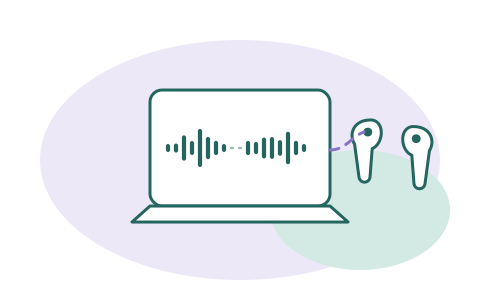
If you see clients on Doxy.me and Zoom, an on-device layer gives your side one consistent sound across both, with processing that stays on your machine. Krisp's pricing on 2026-10-18: 7 trial days, no card on file; then the Core plan at $8 monthly for each clinician if billed once a year, or $16 if billed every month. There is nothing free after the trial, and the live suppression only runs in Krisp's desktop app.
Both platforms' own suppression costs nothing extra, and in a quiet room it is often enough.